

MagicWorld: Interactive Geometry-driven Video World Exploration
Paper • 2511.18886 • Published • 19





This repository is the official implementation of our MagicWorld, an interactive video world model that supports exploring a dynamic scene created from a single scene image through continuous keyboard actions (W, A, S, D), while maintaining structural and temporal consistency.
2026/03/20: We open-source the MagicWorld v1.5 codebase, including training and inference scripts.2026/02/10: We open-source the MagicWorld v1 codebase, including training and inference scripts.2025/11/24: Our Paper on ArXiv is available 🥳!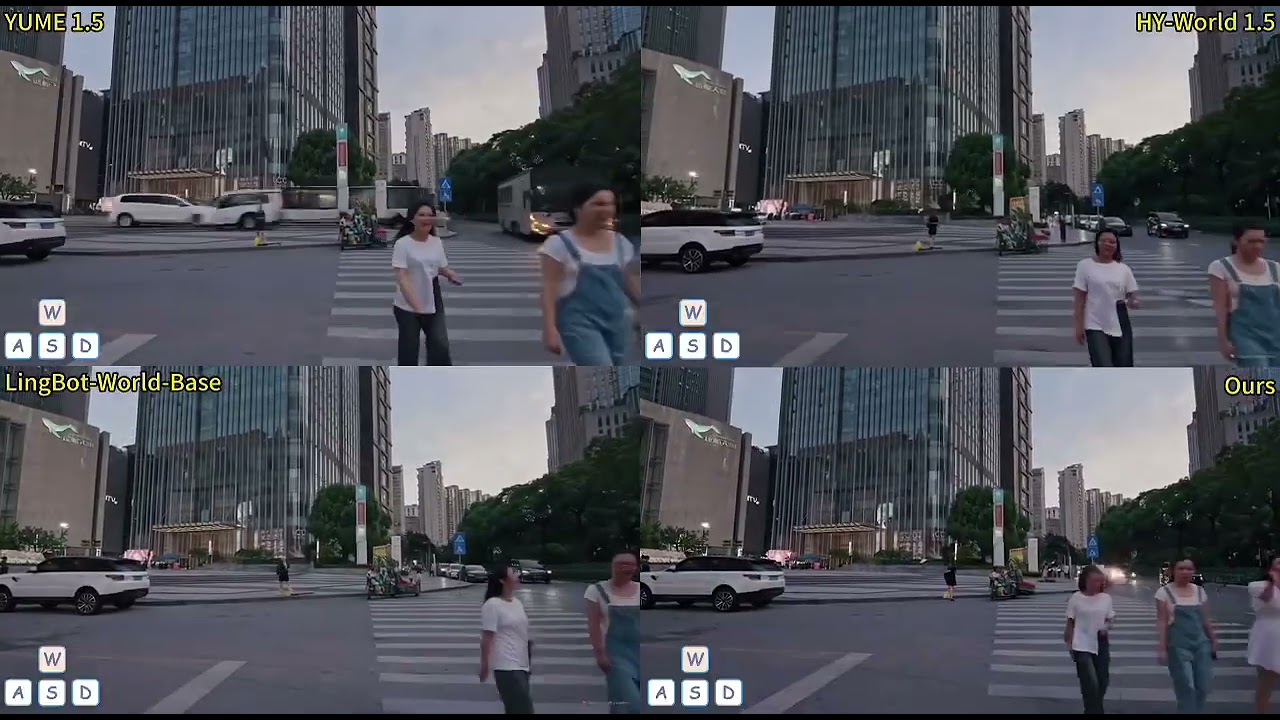
Create a conda environment & install requirements
# python==3.12.9 cuda==12.3 torch==2.2
conda create -n magicworld python==3.12.9
conda activate magicworld
pip install -r requirements.txt
If you encounter an error while installing Flash Attention, please manually download the installation package based on your Python version, CUDA version, and Torch version, and install it using pip install flash_attn-2.7.3+cu12torch2.2cxx11abiFALSE-cp312-cp312-linux_x86_64.whl.
| Models | Download | Features |
|---|---|---|
| MagicWorld-v1.5 | 🤗 Huggingface 🤖 ModelScope | Full framework with geometry condition, motion constraint, history cache retrieval and multi-shot aggregated DMD. |
| MagicWorld-v1.0 | 🤗 Huggingface 🤖 ModelScope | Basic framework with geometry condition and history cache retrieval. |
| MagicWorld-Base | 🤗 Huggingface 🤖 ModelScope | Basic framework. |
Before inference, you need to do two things: (1) install the Uni3C library and its environment, then import the path to your installed Uni3C in uni3c_cam_render_api.py. (2) run action2traj.py to map your keyboard actions to a camera trajectory and generate the trajectory .txt file.
python inference/inference_magicworld_base.py
python inference/inference_magicworld_v1.py
We can choose whether to use deep speed in MagicWorld, which can save a lot of video memory. The data format is shown as follows.
[
    {
      "file_path": "train/00000001.mp4",
      "control_file_path": "camera/trajectory.txt",
      "point_video_path": "render/00000001_render.mp4"
      "text": "A group of young men in suits and sunglasses are walking down a city street.",
      "type": "video"
    },
    .....
]
Some parameters in the sh file can be confusing, and they are explained in this document:
enable_bucket is used to enable bucket training. When enabled, the model does not crop the images and videos at the center, but instead, it trains the entire images and videos after grouping them into buckets based on resolution.random_frame_crop is used for random cropping on video frames to simulate videos with different frame counts.random_hw_adapt is used to enable automatic height and width scaling for images and videos. When random_hw_adapt is enabled, the training images will have their height and width set to image_sample_size as the maximum and min(video_sample_size, 512) as the minimum. For training videos, the height and width will be set to image_sample_size as the maximum and min(video_sample_size, 512) as the minimum.random_hw_adapt is enabled, with video_sample_n_frames=49, video_sample_size=1024, and image_sample_size=1024, the resolution of image inputs for training is 512x512 to 1024x1024, and the resolution of video inputs for training is 512x512x49 to 1024x1024x49.random_hw_adapt is enabled, with video_sample_n_frames=49, video_sample_size=1024, and image_sample_size=256, the resolution of image inputs for training is 256x256 to 1024x1024, and the resolution of video inputs for training is 256x256x49.training_with_video_token_length specifies training the model according to token length. For training images and videos, the height and width will be set to image_sample_size as the maximum and video_sample_size as the minimum.training_with_video_token_length is enabled, with video_sample_n_frames=49, token_sample_size=1024, video_sample_size=1024, and image_sample_size=256, the resolution of image inputs for training is 256x256 to 1024x1024, and the resolution of video inputs for training is 256x256x49 to 1024x1024x49.training_with_video_token_length is enabled, with video_sample_n_frames=49, token_sample_size=512, video_sample_size=1024, and image_sample_size=256, the resolution of image inputs for training is 256x256 to 1024x1024, and the resolution of video inputs for training is 256x256x49 to 1024x1024x9.token_sample_size = 512.resume_from_checkpoint is used to set whether the training should resume from a previous checkpoint. Use a path or "latest" to automatically select the last available checkpoint.When training the model with multiple machines, please set the params as follows:
export MASTER_ADDR="your master address"
export MASTER_PORT=10086
export WORLD_SIZE=1 # The number of machines
export NUM_PROCESS=8 # The number of processes, such as WORLD_SIZE * 8
export RANK=0 # The rank of this machine

accelerate launch --mixed_precision="bf16" --main_process_ip=$MASTER_ADDR --main_process_port=$MASTER_PORT --num_machines=$WORLD_SIZE --num_processes=$NUM_PROCESS --machine_rank=$RANK scripts/xxx.py
You can run the following command:
bash train_magicworld_v1.sh
Our code is modified based on VideoX-Fun. We adopt Wan2.1-I2V-14B as the base model. We use Uni3C to generate 3D points. The style of the logo is borrowed from Helios. We thank Siming Zheng and Shuolin Xu for their initial support and suggestions for our basic framework. Thanks to all the contributors!
Infinite-World
Matrix-Game 2.0
LingBot-World
YUME 1.5
Self-Forcing
LongLive
All the materials, including code, checkpoints, and demos, are made available under the Creative Commons BY-NC-SA 4.0 license. You are free to copy, redistribute, remix, transform, and build upon the project for non-commercial purposes, as long as you give appropriate credit and distribute your contributions under the same license.
@article{li2025magicworld,
  title={MagicWorld: Towards Long-Horizon Stability for Interactive Video World Exploration},
  author={Li, Guangyuan and Li, Bo and Chen, Jinwei and Hu, Xiaobin and Zhao, Lei and Jiang, Peng-Tao},
  journal={arXiv preprint arXiv:2511.18886v2},
  year={2026}
}