

EllieKini/Herta
Audio-to-Audio • Updated
text stringlengths 0 2k | heading1 stringlengths 3 79 | source_page_url stringclasses 189
values | source_page_title stringclasses 189
values |
|---|---|---|---|
**Stream From a Gradio app in 5 lines**
Use the `submit` method to get a job you can iterate over.
In python:
from gradio_client import Client
client = Client("gradio/llm_stream")
for result in client.submit("What's the best UI framework in Python?"):
print(result)
... | Ergonomic API 💆 | https://gradio.app/docs/python-client/version-1-release | Python Client - Version 1 Release Docs |
Anything you can do in the UI, you can do with the client:
* 🔐Authentication
* 🛑 Job Cancelling
* ℹ️ Access Queue Position and API
* 📕 View the API information
Here's an example showing how to display the queue position of a pending job:
from gradio_client import Client
client = ... | Transparent Design 🪟 | https://gradio.app/docs/python-client/version-1-release | Python Client - Version 1 Release Docs |
The client can run from pretty much any python and javascript environment
(node, deno, the browser, Service Workers).
Here's an example using the client from a Flask server using gevent:
from gevent import monkey
monkey.patch_all()
from gradio_client import Client
from flask import Fla... | Portable Design ⛺️ | https://gradio.app/docs/python-client/version-1-release | Python Client - Version 1 Release Docs |
Changes
**Python**
* The `serialize` argument of the `Client` class was removed and has no effect.
* The `upload_files` argument of the `Client` was removed.
* All filepaths must be wrapped in the `handle_file` method. For example, `caption = client.predict(handle_file('./dog.jpg'))`.
* The `output_dir` a... | v1.0 Migration Guide and Breaking | https://gradio.app/docs/python-client/version-1-release | Python Client - Version 1 Release Docs |
ZeroGPU
ZeroGPU spaces are rate-limited to ensure that a single user does not hog all
of the available GPUs. The limit is controlled by a special token that the
Hugging Face Hub infrastructure adds to all incoming requests to Spaces. This
token is a request header called `X-IP-Token` and its value changes depending
on... | Explaining Rate Limits for | https://gradio.app/docs/python-client/using-zero-gpu-spaces | Python Client - Using Zero Gpu Spaces Docs |
Token
In the following hypothetical example, when a user presses enter in the
textbox, the `generate()` function is called, which calls a second function,
`text_to_image()`. Because the Gradio Client is being instantiated indirectly,
in `text_to_image()`, we will need to extract their token from the `X-IP-
Token` head... | Avoiding Rate Limits by Manually Passing an IP | https://gradio.app/docs/python-client/using-zero-gpu-spaces | Python Client - Using Zero Gpu Spaces Docs |
The main Client class for the Python client. This class is used to connect
to a remote Gradio app and call its API endpoints.
| Description | https://gradio.app/docs/python-client/client | Python Client - Client Docs |
from gradio_client import Client
client = Client("abidlabs/whisper-large-v2") connecting to a Hugging Face Space
client.predict("test.mp4", api_name="/predict")
>> What a nice recording! returns the result of the remote API call
client = Client("https://bec81a83-5b5c-471e.gradio.live") conne... | Example usage | https://gradio.app/docs/python-client/client | Python Client - Client Docs |
Parameters ▼
src: str
either the name of the Hugging Face Space to load, (e.g. "abidlabs/whisper-
large-v2") or the full URL (including "http" or "https") of the hosted Gradio
app to load (e.g. "http://mydomain.com/app" or
"https://bec81a83-5b5c-471e.gradio.live/").
token: str | None
d... | Initialization | https://gradio.app/docs/python-client/client | Python Client - Client Docs |
n the remote machine instead.
ssl_verify: bool
default `= True`
if False, skips certificate validation which allows the client to connect to
Gradio apps that are using self-signed certificates.
analytics_enabled: bool
default `= True`
Whether to allow basic telemetry. If None, will u... | Initialization | https://gradio.app/docs/python-client/client | Python Client - Client Docs |
Description
Event listeners allow you to respond to user interactions with the UI
components you've defined in a Gradio Blocks app. When a user interacts with
an element, such as changing a slider value or uploading an image, a function
is called.
Supported Event Listeners
The Client component supports the following... | Event Listeners | https://gradio.app/docs/python-client/client | Python Client - Client Docs |
eters. For hardware upgrades (beyond the basic
CPU tier), you may be required to provide billing information on Hugging Face:
<https://huggingface.co/settings/billing> <br>
Event Parameters
Parameters ▼
args: <class 'inspect._empty'>
The positional arguments to pass to the remote API endpoint. The or... | Event Listeners | https://gradio.app/docs/python-client/client | Python Client - Client Docs |
A Job is a wrapper over the Future class that represents a prediction call
that has been submitted by the Gradio client. This class is not meant to be
instantiated directly, but rather is created by the Client.submit() method.
A Job object includes methods to get the status of the prediction call, as
well to get the ... | Description | https://gradio.app/docs/python-client/job | Python Client - Job Docs |
Parameters ▼
future: Future
The future object that represents the prediction call, created by the
Client.submit() method
communicator: Communicator | None
default `= None`
The communicator object that is used to communicate between the client and the
background thread running the job
... | Initialization | https://gradio.app/docs/python-client/job | Python Client - Job Docs |
Description
Event listeners allow you to respond to user interactions with the UI
components you've defined in a Gradio Blocks app. When a user interacts with
an element, such as changing a slider value or uploading an image, a function
is called.
Supported Event Listeners
The Job component supports the following ev... | Event Listeners | https://gradio.app/docs/python-client/job | Python Client - Job Docs |
If you already have a recent version of `gradio`, then the `gradio_client` is
included as a dependency. But note that this documentation reflects the latest
version of the `gradio_client`, so upgrade if you’re not sure!
The lightweight `gradio_client` package can be installed from pip (or pip3)
and is tested to work w... | Installation | https://gradio.app/docs/python-client/introduction | Python Client - Introduction Docs |
Spaces
Start by connecting instantiating a `Client` object and connecting it to a
Gradio app that is running on Hugging Face Spaces.
from gradio_client import Client
client = Client("abidlabs/en2fr") a Space that translates from English to French
You can also connect to private Spaces by pass... | Connecting to a Gradio App on Hugging Face | https://gradio.app/docs/python-client/introduction | Python Client - Introduction Docs |
use
While you can use any public Space as an API, you may get rate limited by
Hugging Face if you make too many requests. For unlimited usage of a Space,
simply duplicate the Space to create a private Space, and then use it to make
as many requests as you’d like!
The `gradio_client` includes a class method: `Client.d... | Duplicating a Space for private | https://gradio.app/docs/python-client/introduction | Python Client - Introduction Docs |
app
If your app is running somewhere else, just provide the full URL instead,
including the “http://” or “https://“. Here’s an example of making predictions
to a Gradio app that is running on a share URL:
from gradio_client import Client
client = Client("https://bec81a83-5b5c-471e.gradio.live")... | Connecting a general Gradio | https://gradio.app/docs/python-client/introduction | Python Client - Introduction Docs |
Once you have connected to a Gradio app, you can view the APIs that are
available to you by calling the `Client.view_api()` method. For the Whisper
Space, we see the following:
Client.predict() Usage Info
---------------------------
Named API endpoints: 1
- predict(audio, api_name="/pre... | Inspecting the API endpoints | https://gradio.app/docs/python-client/introduction | Python Client - Introduction Docs |
As an alternative to running the `.view_api()` method, you can click on the
“Use via API” link in the footer of the Gradio app, which shows us the same
information, along with example usage.
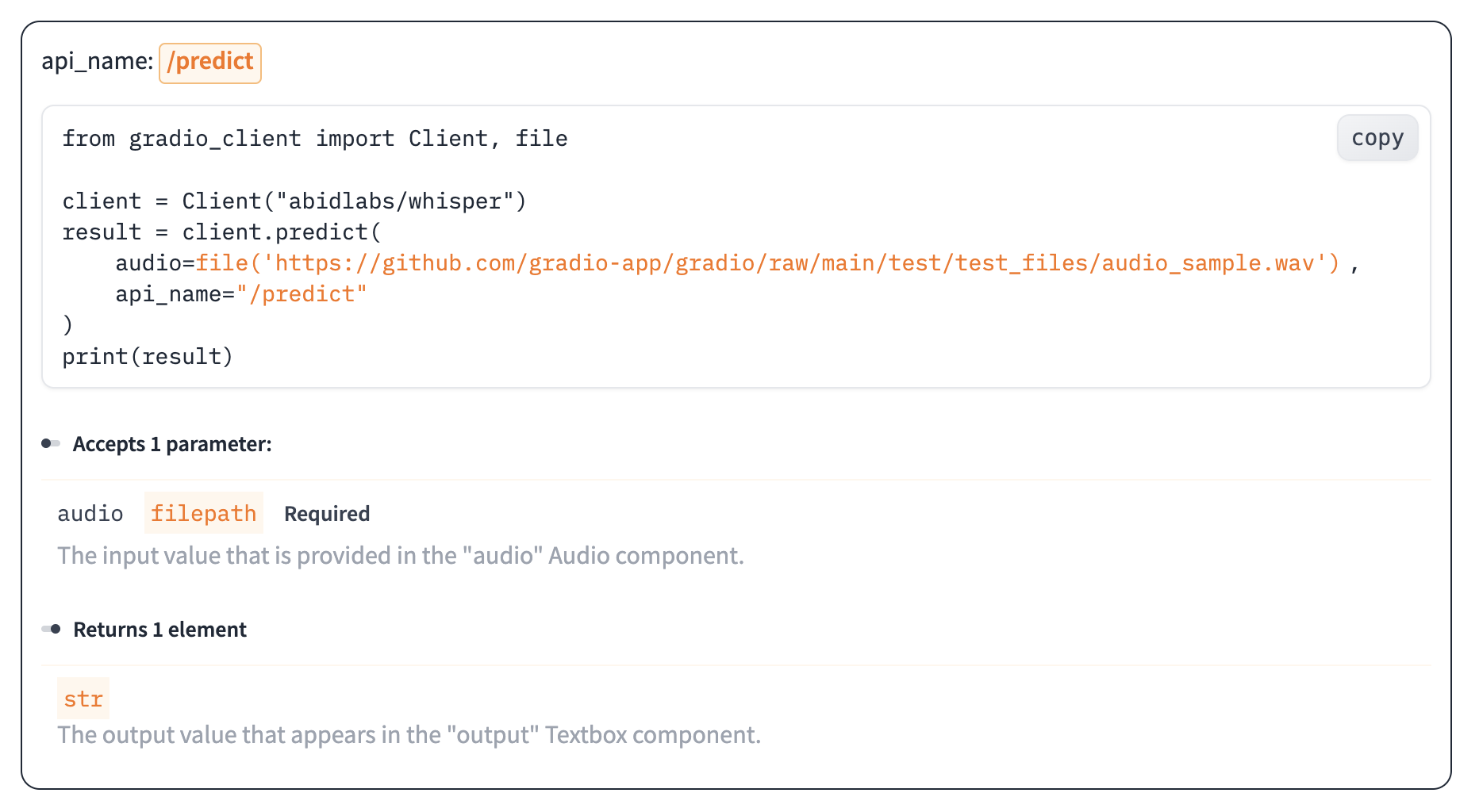
The View API pag... | The “View API” Page | https://gradio.app/docs/python-client/introduction | Python Client - Introduction Docs |
The simplest way to make a prediction is simply to call the `.predict()`
function with the appropriate arguments:
from gradio_client import Client
client = Client("abidlabs/en2fr", api_name='/predict')
client.predict("Hello")
>> Bonjour
If there are multiple parameters, then you sh... | Making a prediction | https://gradio.app/docs/python-client/introduction | Python Client - Introduction Docs |
to the Gradio server and ensures that the file is
preprocessed correctly:
from gradio_client import Client, file
client = Client("abidlabs/whisper")
client.predict(
audio=file("https://audio-samples.github.io/samples/mp3/blizzard_unconditional/sample-0.mp3")
)
>> "My th... | Making a prediction | https://gradio.app/docs/python-client/introduction | Python Client - Introduction Docs |
Oe should note that `.predict()` is a _blocking_ operation as it waits for the
operation to complete before returning the prediction.
In many cases, you may be better off letting the job run in the background
until you need the results of the prediction. You can do this by creating a
`Job` instance using the `.submit(... | Running jobs asynchronously | https://gradio.app/docs/python-client/introduction | Python Client - Introduction Docs |
Alternatively, one can add one or more callbacks to perform actions after the
job has completed running, like this:
from gradio_client import Client
def print_result(x):
print("The translated result is: {x}")
client = Client(space="abidlabs/en2fr")
job = client.submit("... | Adding callbacks | https://gradio.app/docs/python-client/introduction | Python Client - Introduction Docs |
The `Job` object also allows you to get the status of the running job by
calling the `.status()` method. This returns a `StatusUpdate` object with the
following attributes: `code` (the status code, one of a set of defined strings
representing the status. See the `utils.Status` class), `rank` (the current
position of th... | Status | https://gradio.app/docs/python-client/introduction | Python Client - Introduction Docs |
The `Job` class also has a `.cancel()` instance method that cancels jobs that
have been queued but not started. For example, if you run:
client = Client("abidlabs/whisper")
job1 = client.submit(file("audio_sample1.wav"))
job2 = client.submit(file("audio_sample2.wav"))
job1.cancel() will retu... | Cancelling Jobs | https://gradio.app/docs/python-client/introduction | Python Client - Introduction Docs |
Some Gradio API endpoints do not return a single value, rather they return a
series of values. You can get the series of values that have been returned at
any time from such a generator endpoint by running `job.outputs()`:
from gradio_client import Client
client = Client(src="gradio/count_genera... | Generator Endpoints | https://gradio.app/docs/python-client/introduction | Python Client - Introduction Docs |
Gradio demos can include [session state](https://www.gradio.app/guides/state-
in-blocks), which provides a way for demos to persist information from user
interactions within a page session.
For example, consider the following demo, which maintains a list of words that
a user has submitted in a `gr.State` component. Wh... | Demos with Session State | https://gradio.app/docs/python-client/introduction | Python Client - Introduction Docs |
Creates a textarea for user to enter string input or display string output.
| Description | https://gradio.app/docs/gradio/textbox | Gradio - Textbox Docs |
**Using Textbox as an input component.**
How Textbox will pass its value to your function:
Type: `str | None`
Passes text value as a `str` into the function.
Example Code
import gradio as gr
def predict(
value: str | None
):
process value from... | Behavior | https://gradio.app/docs/gradio/textbox | Gradio - Textbox Docs |
Parameters ▼
value: str | I18nData | Callable | None
default `= None`
text to show in textbox. If a function is provided, the function will be
called each time the app loads to set the initial value of this component.
type: Literal['text', 'password', 'email']
default `= "text"`
The ... | Initialization | https://gradio.app/docs/gradio/textbox | Gradio - Textbox Docs |
e regular interval for the reset Timer.
inputs: Component | list[Component] | set[Component] | None
default `= None`
components that are used as inputs to calculate `value` if `value` is a
function (has no effect otherwise). `value` is recalculated any time the
inputs change.
show_labe... | Initialization | https://gradio.app/docs/gradio/textbox | Gradio - Textbox Docs |
targeting CSS styles.
autofocus: bool
default `= False`
If True, will focus on the textbox when the page loads. Use this carefully, as
it can cause usability issues for sighted and non-sighted users.
autoscroll: bool
default `= True`
If True, will automatically scroll to the bottom o... | Initialization | https://gradio.app/docs/gradio/textbox | Gradio - Textbox Docs |
True. Can only be changed if `type` is "text".
rtl: bool
default `= False`
If True and `type` is "text", sets the direction of the text to right-to-left
(cursor appears on the left of the text). Default is False, which renders
cursor on the right.
buttons: list[Literal['copy'] | Button... | Initialization | https://gradio.app/docs/gradio/textbox | Gradio - Textbox Docs |
InputHTMLAttributes(autocorrect="off", spellcheck=False) to disable
autocorrect and spellcheck.
| Initialization | https://gradio.app/docs/gradio/textbox | Gradio - Textbox Docs |
Shortcuts
gradio.Textbox
Interface String Shortcut `"textbox"`
Initialization Uses default values
gradio.TextArea
Interface String Shortcut `"textarea"`
Initialization Uses lines=7
| Shortcuts | https://gradio.app/docs/gradio/textbox | Gradio - Textbox Docs |
Multi-line text input
By default, `gr.Textbox` renders as a single-line input. For longer text such
as paragraphs or code, set `lines` to show multiple rows and optionally
`max_lines` to cap the height:
import gradio as gr
def summarize(text):
return f"Received {len(text.split())} words... | Common Patterns | https://gradio.app/docs/gradio/textbox | Gradio - Textbox Docs |
hello_worlddiff_textssentence_builder
| Demos | https://gradio.app/docs/gradio/textbox | Gradio - Textbox Docs |
Description
Event listeners allow you to respond to user interactions with the UI
components you've defined in a Gradio Blocks app. When a user interacts with
an element, such as changing a slider value or uploading an image, a function
is called.
Supported Event Listeners
The Textbox component supports the followin... | Event Listeners | https://gradio.app/docs/gradio/textbox | Gradio - Textbox Docs |
t data gradio.CopyData to carry information about the copied content. See
EventData documentation on how to use this event data
Event Parameters
Parameters ▼
fn: Callable | None | Literal['decorator']
default `= "decorator"`
the function to call when this event is triggered. Often a machine learning... | Event Listeners | https://gradio.app/docs/gradio/textbox | Gradio - Textbox Docs |
True, will scroll to output component on completion
show_progress: Literal['full', 'minimal', 'hidden']
default `= "full"`
how to show the progress animation while event is running: "full" shows a
spinner which covers the output component area as well as a runtime display in
the upper right corner, "m... | Event Listeners | https://gradio.app/docs/gradio/textbox | Gradio - Textbox Docs |
ent data before returning 'fn'
output to the browser.
cancels: dict[str, Any] | list[dict[str, Any]] | None
default `= None`
A list of other events to cancel when this listener is triggered. For example,
setting cancels=[click_event] will cancel the click_event, where click_event
is the return value o... | Event Listeners | https://gradio.app/docs/gradio/textbox | Gradio - Textbox Docs |
oncurrency_limit.
api_visibility: Literal['public', 'private', 'undocumented']
default `= "public"`
controls the visibility and accessibility of this endpoint. Can be "public"
(shown in API docs and callable by clients), "private" (hidden from API docs
and not callable by the Gradio client libraries),... | Event Listeners | https://gradio.app/docs/gradio/textbox | Gradio - Textbox Docs |
This function allows you to pass custom info messages to the user. You can
do so simply by writing `gr.Info('message here')` in your function, and when
that line is executed the custom message will appear in a modal on the demo.
The modal is gray by default and has the heading: "Info." Queue must be
enabled for this be... | Description | https://gradio.app/docs/gradio/info | Gradio - Info Docs |
import gradio as gr
def hello_world():
gr.Info('This is some info.')
return "hello world"
with gr.Blocks() as demo:
md = gr.Markdown()
demo.load(hello_world, inputs=None, outputs=[md])
demo.queue().launch()
| Example Usage | https://gradio.app/docs/gradio/info | Gradio - Info Docs |
Parameters ▼
message: str
default `= "Info issued."`
The info message to be displayed to the user. Can be HTML, which will be
rendered in the modal.
duration: float | None
default `= 10`
The duration in seconds that the info message should be displayed for. If None
or 0, the message ... | Initialization | https://gradio.app/docs/gradio/info | Gradio - Info Docs |
blocks_chained_events
[Alerts](../../guides/alerts)
| Demos | https://gradio.app/docs/gradio/info | Gradio - Info Docs |
A TabbedInterface is created by providing a list of Interfaces or Blocks,
each of which gets rendered in a separate tab. Only the components from the
Interface/Blocks will be rendered in the tab.
| Description | https://gradio.app/docs/gradio/tabbedinterface | Gradio - Tabbedinterface Docs |
Parameters ▼
interface_list: list[Blocks]
A list of Interfaces (or Blocks) to be rendered in the tabs.
tab_names: list[str] | None
default `= None`
A list of tab names. If None, the tab names will be "Tab 1", "Tab 2", etc.
title: str | None
default `= None`
The tab t... | Initialization | https://gradio.app/docs/gradio/tabbedinterface | Gradio - Tabbedinterface Docs |
tabbed_interface_lite
| Demos | https://gradio.app/docs/gradio/tabbedinterface | Gradio - Tabbedinterface Docs |
The gr.KeyUpData class is a subclass of gr.EventData that specifically
carries information about the `.key_up()` event. When gr.KeyUpData is added as
a type hint to an argument of an event listener method, a gr.KeyUpData object
will automatically be passed as the value of that argument. The attributes of
this object co... | Description | https://gradio.app/docs/gradio/keyupdata | Gradio - Keyupdata Docs |
import gradio as gr
def test(value, key_up_data: gr.KeyUpData):
return {
"component value": value,
"input value": key_up_data.input_value,
"key": key_up_data.key
}
with gr.Blocks() as demo:
d = gr.Dropdown(["abc", "def"], allow_custom_value=T... | Example Usage | https://gradio.app/docs/gradio/keyupdata | Gradio - Keyupdata Docs |
Parameters ▼
key: str
The key that was pressed.
input_value: str
The displayed value in the input textbox after the key was pressed. This may
be different than the `value` attribute of the component itself, as the
`value` attribute of some components (e.g. Dropdown) are not updated unt... | Attributes | https://gradio.app/docs/gradio/keyupdata | Gradio - Keyupdata Docs |
dropdown_key_up
| Demos | https://gradio.app/docs/gradio/keyupdata | Gradio - Keyupdata Docs |
Button that clears the value of a component or a list of components when
clicked. It is instantiated with the list of components to clear.
| Description | https://gradio.app/docs/gradio/clearbutton | Gradio - Clearbutton Docs |
**Using ClearButton as an input component.**
How ClearButton will pass its value to your function:
Type: `str | None`
(Rarely used) the `str` corresponding to the button label when the button is
clicked
Example Code
import gradio as gr
def predict(
value: str | N... | Behavior | https://gradio.app/docs/gradio/clearbutton | Gradio - Clearbutton Docs |
Parameters ▼
components: None | list[Component] | Component
default `= None`
value: str
default `= "Clear"`
default text for the button to display. If a function is provided, the
function will be called each time the app loads to set the initial value of
this component.
... | Initialization | https://gradio.app/docs/gradio/clearbutton | Gradio - Clearbutton Docs |
ent will be visually
hidden and not take up space in the layout but still exist in the DOM
interactive: bool
default `= True`
if False, the Button will be in a disabled state.
elem_id: str | None
default `= None`
an optional string that is assigned as the id of this component in the ... | Initialization | https://gradio.app/docs/gradio/clearbutton | Gradio - Clearbutton Docs |
min_width: int | None
default `= None`
minimum pixel width, will wrap if not sufficient screen space to satisfy this
value. If a certain scale value results in this Component being narrower than
min_width, the min_width parameter will be respected first.
api_name: str | None
default `= None... | Initialization | https://gradio.app/docs/gradio/clearbutton | Gradio - Clearbutton Docs |
Shortcuts
gradio.ClearButton
Interface String Shortcut `"clearbutton"`
Initialization Uses default values
| Shortcuts | https://gradio.app/docs/gradio/clearbutton | Gradio - Clearbutton Docs |
Description
Event listeners allow you to respond to user interactions with the UI
components you've defined in a Gradio Blocks app. When a user interacts with
an element, such as changing a slider value or uploading an image, a function
is called.
Supported Event Listeners
The ClearButton component supports the foll... | Event Listeners | https://gradio.app/docs/gradio/clearbutton | Gradio - Clearbutton Docs |
Sets up an API or MCP endpoint for a generic function without needing
define events listeners or components. Derives its typing from type hints in
the provided function's signature rather than the components.
| Description | https://gradio.app/docs/gradio/api | Gradio - Api Docs |
import gradio as gr
with gr.Blocks() as demo:
with gr.Row():
input = gr.Textbox()
button = gr.Button("Submit")
output = gr.Textbox()
def fn(a: int, b: int, c: list[str]) -> tuple[int, str]:
return a + b, c[a:b]
gr.api(fn, api_name="add_and_slice")
... | Example Usage | https://gradio.app/docs/gradio/api | Gradio - Api Docs |
Parameters ▼
fn: Callable | Literal['decorator']
default `= "decorator"`
the function to call when this event is triggered. Often a machine learning
model's prediction function. The function should be fully typed, and the type
hints will be used to derive the typing information for the API/MCP endpoin... | Initialization | https://gradio.app/docs/gradio/api | Gradio - Api Docs |
eue
(only relevant if batch=True)
concurrency_limit: int | None | Literal['default']
default `= "default"`
If set, this is the maximum number of this event that can be running
simultaneously. Can be set to None to mean no concurrency_limit (any number of
this event can be running simultaneously). Set ... | Initialization | https://gradio.app/docs/gradio/api | Gradio - Api Docs |
This class is a wrapper over the Dataset component and can be used to
create Examples for Blocks / Interfaces. Populates the Dataset component with
examples and assigns event listener so that clicking on an example populates
the input/output components. Optionally handles example caching for fast
inference.
| Description | https://gradio.app/docs/gradio/examples | Gradio - Examples Docs |
Parameters ▼
examples: list[Any] | list[list[Any]] | str
example inputs that can be clicked to populate specific components. Should be
nested list, in which the outer list consists of samples and each inner list
consists of an input corresponding to each input component. A string path to a
directory of... | Initialization | https://gradio.app/docs/gradio/examples | Gradio - Examples Docs |
d in Gradio's
UI for cached examples.
cache_mode: Literal['eager', 'lazy'] | None
default `= None`
if "lazy", examples are cached after their first use. If "eager", all examples
are cached at app launch. If None, will use the GRADIO_CACHE_MODE environment
variable if defined, or default to "eager".
... | Initialization | https://gradio.app/docs/gradio/examples | Gradio - Examples Docs |
ow the event associated with clicking on the examples appears in the
API docs. Can be a string or None. If set to a string, the endpoint will be
exposed in the API docs with the given name. If None, an auto-generated name
will be used.
api_description: str | None | Literal[False]
default `= None`
Desc... | Initialization | https://gradio.app/docs/gradio/examples | Gradio - Examples Docs |
Parameters ▼
dataset: gradio.Dataset
The `gr.Dataset` component corresponding to this Examples object.
load_input_event: gradio.events.Dependency
The Gradio event that populates the input values when the examples are
clicked. You can attach a `.then()` or a `.success()` to this event t... | Attributes | https://gradio.app/docs/gradio/examples | Gradio - Examples Docs |
**Updating Examples**
In this demo, we show how to update the examples by updating the samples of
the underlying dataset. Note that this only works if `cache_examples=False` as
updating the underlying dataset does not update the cache.
import gradio as gr
def update_examples(country):
i... | Examples | https://gradio.app/docs/gradio/examples | Gradio - Examples Docs |
calculator_blocks
| Demos | https://gradio.app/docs/gradio/examples | Gradio - Examples Docs |
Creates a gallery component that allows displaying a grid of images or
videos, and optionally captions. If used as an input, the user can upload
images or videos to the gallery. If used as an output, the user can click on
individual images or videos to view them at a higher resolution.
| Description | https://gradio.app/docs/gradio/gallery | Gradio - Gallery Docs |
**Using Gallery as an input component.**
How Gallery will pass its value to your function:
Type: `list[tuple[str, str | None]] | list[tuple[PIL.Image.Image, str | None]] | list[tuple[np.ndarray, str | None]] | None`
Passes the list of images or videos as:
* a list of (media, caption) tuples
* a list of (media,... | Behavior | https://gradio.app/docs/gradio/gallery | Gradio - Gallery Docs |
Parameters ▼
value: list[np.ndarray | PIL.Image.Image | str | Path | tuple] | Callable | None
default `= None`
List of images or videos to display in the gallery by default. If a function
is provided, the function will be called each time the app loads to set the
initial value of this component.
... | Initialization | https://gradio.app/docs/gradio/gallery | Gradio - Gallery Docs |
e). `value` is recalculated any time the
inputs change.
show_label: bool | None
default `= None`
if True, will display label.
container: bool
default `= True`
If True, will place the component in a container - providing some extra
padding around the border.
scale: int... | Initialization | https://gradio.app/docs/gradio/gallery | Gradio - Gallery Docs |
with the same key across re-renders are treated as
the same component, not a new component. Properties set in 'preserved_by_key'
are not reset across a re-render.
preserved_by_key: list[str] | str | None
default `= "value"`
A list of parameters from this component's constructor. Inside a gr.render()
... | Initialization | https://gradio.app/docs/gradio/gallery | Gradio - Gallery Docs |
`= None`
CSS object-fit property for the thumbnail images in the gallery. Can be
"contain", "cover", "fill", "none", or "scale-down".
buttons: list[Literal['share', 'download', 'fullscreen'] | Button] | None
default `= None`
A list of buttons to show in the top right corner of the component. Valid
o... | Initialization | https://gradio.app/docs/gradio/gallery | Gradio - Gallery Docs |
n upload images from when this component is
used as an input. Valid options are "upload", "webcam", and "clipboard".
"upload" allows the user to upload files from their computer, "webcam" allows
the user to take a photo or video using their webcam, and "clipboard" allows
the user to paste an image or video from their c... | Initialization | https://gradio.app/docs/gradio/gallery | Gradio - Gallery Docs |
Shortcuts
gradio.Gallery
Interface String Shortcut `"gallery"`
Initialization Uses default values
| Shortcuts | https://gradio.app/docs/gradio/gallery | Gradio - Gallery Docs |
fake_gangif_maker
| Demos | https://gradio.app/docs/gradio/gallery | Gradio - Gallery Docs |
Description
Event listeners allow you to respond to user interactions with the UI
components you've defined in a Gradio Blocks app. When a user interacts with
an element, such as changing a slider value or uploading an image, a function
is called.
Supported Event Listeners
The Gallery component supports the followin... | Event Listeners | https://gradio.app/docs/gradio/gallery | Gradio - Gallery Docs |
fn: Callable | None | Literal['decorator']
default `= "decorator"`
the function to call when this event is triggered. Often a machine learning
model's prediction function. Each parameter of the function corresponds to one
input component, and the function should return a single value or a tuple of
values, with each e... | Event Listeners | https://gradio.app/docs/gradio/gallery | Gradio - Gallery Docs |
event is running: "full" shows a
spinner which covers the output component area as well as a runtime display in
the upper right corner, "minimal" only shows the runtime display, "hidden"
shows no progress animation at all
show_progress_on: Component | list[Component] | None
default `= None`
Component... | Event Listeners | https://gradio.app/docs/gradio/gallery | Gradio - Gallery Docs |
this listener is triggered. For example,
setting cancels=[click_event] will cancel the click_event, where click_event
is the return value of another components .click method. Functions that have
not yet run (or generators that are iterating) will be cancelled, but
functions that are currently running will be allowed to... | Event Listeners | https://gradio.app/docs/gradio/gallery | Gradio - Gallery Docs |
be "public"
(shown in API docs and callable by clients), "private" (hidden from API docs
and not callable by the Gradio client libraries), or "undocumented" (hidden
from API docs but callable by clients and via gr.load). If fn is None,
api_visibility will automatically be set to "private".
time_limit: ... | Event Listeners | https://gradio.app/docs/gradio/gallery | Gradio - Gallery Docs |
Creates a scatter plot component to display data from a pandas DataFrame.
| Description | https://gradio.app/docs/gradio/scatterplot | Gradio - Scatterplot Docs |
**Using ScatterPlot as an input component.**
How ScatterPlot will pass its value to your function:
Type: `PlotData | None`
The data to display in a line plot.
Example Code
import gradio as gr
def predict(
value: PlotData | None
):
process valu... | Behavior | https://gradio.app/docs/gradio/scatterplot | Gradio - Scatterplot Docs |
Parameters ▼
value: pd.DataFrame | Callable | None
default `= None`
The pandas dataframe containing the data to display in the plot.
x: str | None
default `= None`
Column corresponding to the x axis. Column can be numeric, datetime, or
string/category.
y: str | None
... | Initialization | https://gradio.app/docs/gradio/scatterplot | Gradio - Scatterplot Docs |
ne`
List containing column names of the series to show in the legend. By default,
all series are shown.
x_lim: list[float | None] | None
default `= None`
A tuple or list containing the limits for the x-axis, specified as [x_min,
x_max]. To fix only one of these values, set the other to None, e.g. [0,... | Initialization | https://gradio.app/docs/gradio/scatterplot | Gradio - Scatterplot Docs |
", "-x", "-y", or list of strings that represent the order of the
categories.
tooltip: Literal['axis', 'none', 'all'] | list[str]
default `= "axis"`
The tooltip to display when hovering on a point. "axis" shows the values for
the axis columns, "all" shows all column values, and "none" shows no tooltip... | Initialization | https://gradio.app/docs/gradio/scatterplot | Gradio - Scatterplot Docs |
uts: Component | list[Component] | Set[Component] | None
default `= None`
Components that are used as inputs to calculate `value` if `value` is a
function (has no effect otherwise). `value` is recalculated any time the
inputs change.
visible: bool | Literal['hidden']
default `= True`
Whether the plo... | Initialization | https://gradio.app/docs/gradio/scatterplot | Gradio - Scatterplot Docs |
-render.
preserved_by_key: list[str] | str | None
default `= "value"`
A list of parameters from this component's constructor. Inside a gr.render()
function, if a component is re-rendered with the same key, these (and only
these) parameters will be preserved in the UI (if they have been changed by
the ... | Initialization | https://gradio.app/docs/gradio/scatterplot | Gradio - Scatterplot Docs |
`gr.LinePlot`, `gr.ScatterPlot`, and `gr.BarPlot` all share the same API. Here
is a summary of the most important features. For full details and live demos,
see the [Creating Plots](/guides/creating-plots) and [Time
Plots](/guides/time-plots) guides.
**Basic Usage with a DataFrame**
Pass a `pd.DataFrame` as the value... | Key Concepts | https://gradio.app/docs/gradio/scatterplot | Gradio - Scatterplot Docs |
gr.ScatterPlot(df, x="weight", y="height")
@plot.select
def zoom(selection: gr.SelectData):
return gr.ScatterPlot(x_lim=[selection.index[0], selection.index[1]])
plot.double_click(lambda: gr.ScatterPlot(x_lim=None), outputs=plot)
**Realtime Data**
Use `gr.Timer` to keep ... | Key Concepts | https://gradio.app/docs/gradio/scatterplot | Gradio - Scatterplot Docs |
Shortcuts
gradio.ScatterPlot
Interface String Shortcut `"scatterplot"`
Initialization Uses default values
| Shortcuts | https://gradio.app/docs/gradio/scatterplot | Gradio - Scatterplot Docs |
scatter_plot_demo
| Demos | https://gradio.app/docs/gradio/scatterplot | Gradio - Scatterplot Docs |
Description
Event listeners allow you to respond to user interactions with the UI
components you've defined in a Gradio Blocks app. When a user interacts with
an element, such as changing a slider value or uploading an image, a function
is called.
Supported Event Listeners
The ScatterPlot component supports the foll... | Event Listeners | https://gradio.app/docs/gradio/scatterplot | Gradio - Scatterplot Docs |
of gradio.components to use as inputs. If the function takes no inputs,
this should be an empty list.
outputs: Component | BlockContext | list[Component | BlockContext] | Set[Component | BlockContext] | None
default `= None`
List of gradio.components to use as outputs. If the function returns no
outp... | Event Listeners | https://gradio.app/docs/gradio/scatterplot | Gradio - Scatterplot Docs |
No dataset card yet